The Best Free Road Trip Route Planner (Better Than Google Maps)
Plan complex drives, optimize your route, and map up to 25 stops for free (or 50 with Premium). The 10-stop limit ends here.
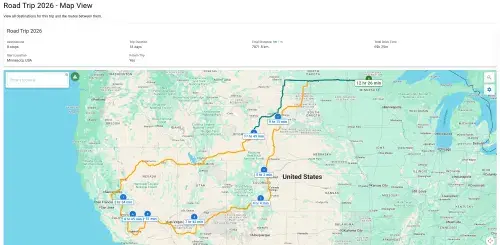
We love Google Maps, but it has a major flaw: it restricts you to just 10 stops. For a real road trip, that simply isn't enough.
Whether you are planning a cross-country American adventure or a scenic weekend drive, Trekkin Around gives you up to 25 stops for free and up to 50 stops with Premium. We handle the logistics so you can enjoy the drive.
See it in Action
Why Google Maps Isn't Enough for Road Trips
🍝
The "Spaghetti" Route
You enter 15 stops, and the route zig-zags inefficiently across the city. Google Maps often connects points in the order you type them, not the order that makes sense.
🧱
The 10-Stop Wall
Once you hit 10 destinations, you have to start a new map tab or delete stops. It’s a mess.
Features Built for the Open Road
1. One-Click Route Optimization
Don't waste gas. Enter all the places you want to visit—national parks, roadside diners, hotels—and hit "Optimize." Our algorithm solves the "Traveling Salesman Problem" instantly, rearranging your stops into the most efficient order to save you time and fuel.
2. Up to 50 Stops (5x Google Maps)
Freedom from the 10-stop wall. Add up to 25 stops on our free tier (2.5x Google Maps) or up to 50 stops with Premium. Plan every roadside attraction, scenic lookout, and detour with confidence.
3. Elevation Profile Along Your Route
See the hills before you hit them. Premium members can overlay real elevation data sampled at dozens of points along every road segment—not just at destinations. Spot mountain passes, long descents, and flat stretches before you set off.
Perfect For...
Van Life & RVers
Plan routes that avoid low bridges and find campgrounds with user reviews.
Delivery Drivers
Optimize your daily delivery route to finish an hour early.
Epic Vacations
From Route 66 to the Pacific Coast Highway, visualize the entire journey in one view.